

Modes
The mode switch under the chat box picks what a message does:- Agent: the agent plans and works on the canvas with tools. Needs an agent to be enabled (below).
- Image and Video: send the prompt straight to a generator, no agent involved. These work out of the box.
/ to pick a skill and @ to reference brand kits, characters, products or canvas items.
Settings
The Agent is off by default. Open Agent Settings from the agent picker and turn on Enable MCP and Enable Agent.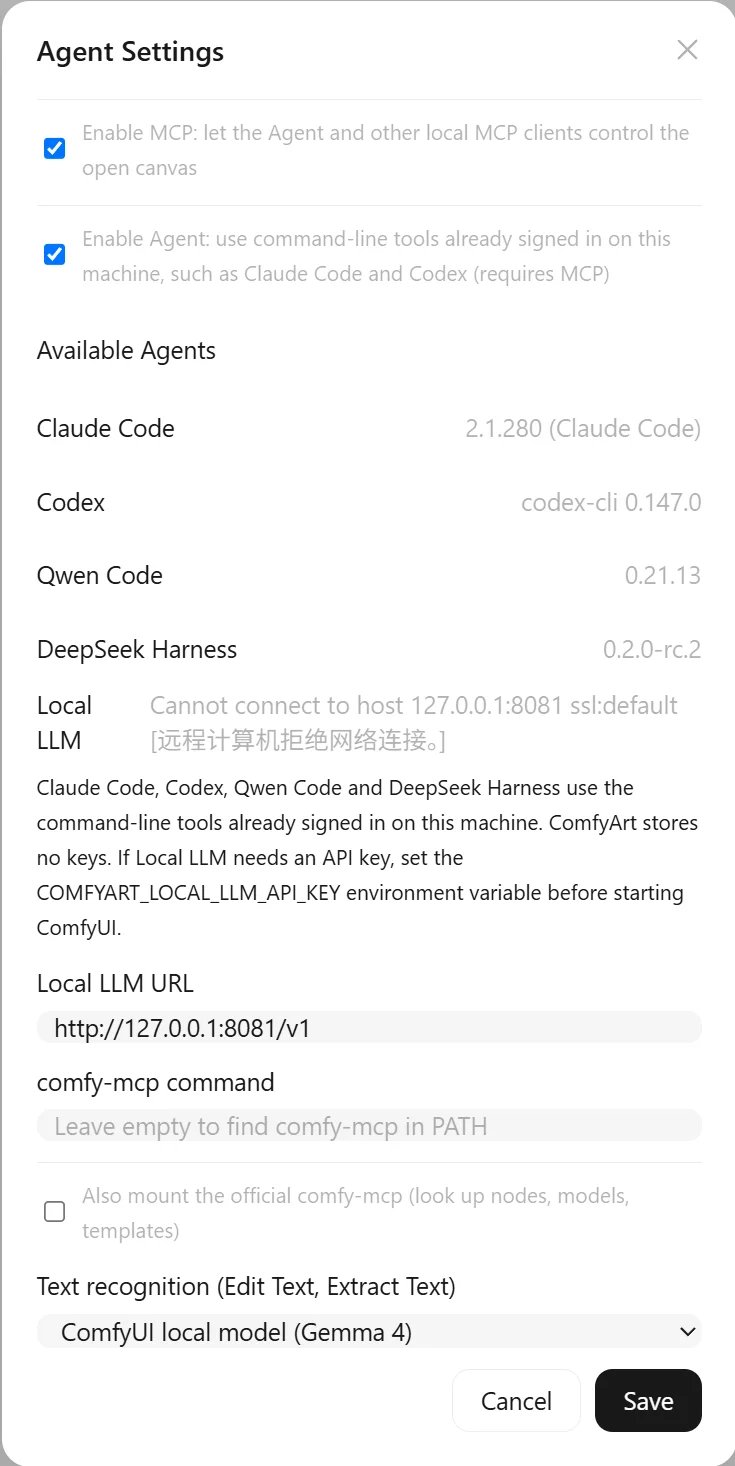
Other settings:
- comfy-mcp: optionally mount the official comfy-mcp server too, so the agent can look up nodes, models and templates.
- Text recognition: Edit Text and Extract Text read text with the local Gemma 4 model in ComfyUI by default, with a progress status while it loads and reads. Switch to Agent to use the default agent instead.
- Model Preferences (button under the chat box): let the agent choose models automatically or fix one per task, with separate Image and Video tabs.
Chats
- Chats are saved in a SQLite database (
user/__comfyart/data.db) and keep running when the panel is closed. The canvas tools run in the open ComfyArt tab of the project, so keep that tab open while the agent works. - Stop a run, edit and resend a message, branch a chat, see context usage, and open each result’s details (process, outputs, original prompt).
- The agent can review the canvas frame by frame, summarize comments into a fix plan, and point you to results on the canvas.
- The notification center collects suggestions, comment fixes and finished tasks, and a browser notification fires when a task is done.
- Voice input transcribes with a local speech model.
Skills
Skills are folders with aSKILL.md plus any extra files (images, text). Use the built-in ones, write your own, import a folder, or save a workflow from a chat as a skill. Skills keep version history with rollback. Image files are shown to the agent; text files are included by relevance within a context budget.